Introduction
The Lenovo LOQ gaming laptop series provides exceptional value in 2026 for smooth 1080p gaming without exceeding financial limits. Positioned as Lenovo’s accessible entry-to-mid-range gaming solution beneath the high-end Legion series, the LOQ integrates cutting-edge Intel Core Ultra processors or AMD Ryzen 200-series chips alongside NVIDIA RTX 40-series graphics cards into robust 15- and 16-inch frames.
This comprehensive guide addresses gaps often overlooked in mainstream reviews: precise Configuration recommendations tailored to your spending capacity and specific applications, honest insights into thermal dynamics and power constraints, plus a structured buyer evaluation framework.
Why Lenovo LOQ Stands Out in 2026
In the crowded field of budget gaming hardware, the Lenovo LOQ emerges as a frontrunner thanks to its MIL-STD-810H military-grade resilience, spacious full-sized keyboard featuring a dedicated numeric keypad, and the innovative Lenovo AI Engine+ system that dynamically adjusts performance profiles—no need for hands-on overclocking or complex tweaks. Departing from the fragile constructions of lesser competitors,
When stacked against costlier Legion models (sleeker designs but commanding $300+ premiums) or mundane productivity ultrabooks, LOQ strikes a perfect equilibrium between raw gaming prowess and everyday portability, suiting shared dorm environments or frequent commuters. Its fingerprint-resistant matte plastic chassis withstands daily wear, while customizable RGB backlighting on the keyboard facilitates extended Valorant marathons in low-light conditions without causing visual fatigue.
Which One Fits Your Budget?
Lenovo LOQ presents a graduated lineup of builds customized for diverse financial brackets—select wisely according to your preferred games, future expansion intentions, and workload intensity. Each tier builds progressively, ensuring scalability without wasteful overspending.
Entry-Level LOQ (RTX 2050/3050, 8GB RAM)
The foundational Lenovo LOQ equipped with 12th/13th-generation Intel processors or Ryzen 5 APUs paired with RTX 2050/3050 GPUs excels in relaxed 1080p gameplay on moderate graphical presets, such as League of Legends, exceeding 100 FPS consistently. Retailing around $700-850, this setup appeals to budget-strapped students who alternate between coding in Visual Studio Code and revisiting classic AAA experiences like GTA V.
A standout feature is the dual SODIMM slots, allowing seamless RAM escalation to 16GB for smoother multitasking—crucial when juggling Zoom calls, browser tabs, and Discord overlays. Real-world tests show it sustains 60+ FPS in Fortnite at medium settings, making it a steal for entry-level esports enthusiasts.
Mid-Tier LOQ (RTX 4050/4060, 16GB RAM)
Priced at $900-1,100, configurations boasting RTX 4050/4060 graphics alongside Intel Core i7 or Ryzen 7 powerhouses command searches for “1080p gaming laptop under 1000.” These deliver 90-120 FPS in demanding open-world epics like Cyberpunk 2077 on elevated settings, amplified by DLSS 3 for enhanced longevity against upcoming releases.
Perfect for hybrid users blending Counter-Strike 2 sessions with entry-level video editing in Adobe Premiere, this sweet spot minimizes compromises. Benchmarks from 3DMark Time Spy reveal scores rivaling pricier rigs, with ray tracing enabled for lifelike shadows in modern shooters.
High-End LOQ (RTX 4070/4080, 32GB RAM)
Premium variants approaching $1,200-1,500 unleash near-Legion-tier capabilities via RTX 4070 GPUs on 140Hz 1080p ultra presets, ideal for aspiring pros or creators handling 4K footage exports. Coupled with 1TB NVMe SSDs, they accelerate workflows in tools like Blender. Critical caveat: Opt for a 230W+ power adapter to sidestep power capping— the standard 170W variant restricts high-end GPUs, slashing performance by up to 30%.
| Configuration | GPU/CPU Example | Price Range (USD) | Best For | Key Upgrade Tip |
| Entry-Level | RTX 3050 / Ryzen 5 | $700-850 | Casual/Students | Add 16GB RAM |
| Mid-Tier | RTX 4060 / Core i7 | $900-1,100 | Esports/Budget Creators | None needed |
| High-End | RTX 4070 / Ryzen 9 | $1,200-1,500 | Competitive/4K Editing | 230W Charger |
This table simplifies choices, but factor in regional pricing—Daraz.PK often discounts mid-tier Models by 10-15% during sales.
Real-World Performance: Gaming, Content, and Productivity
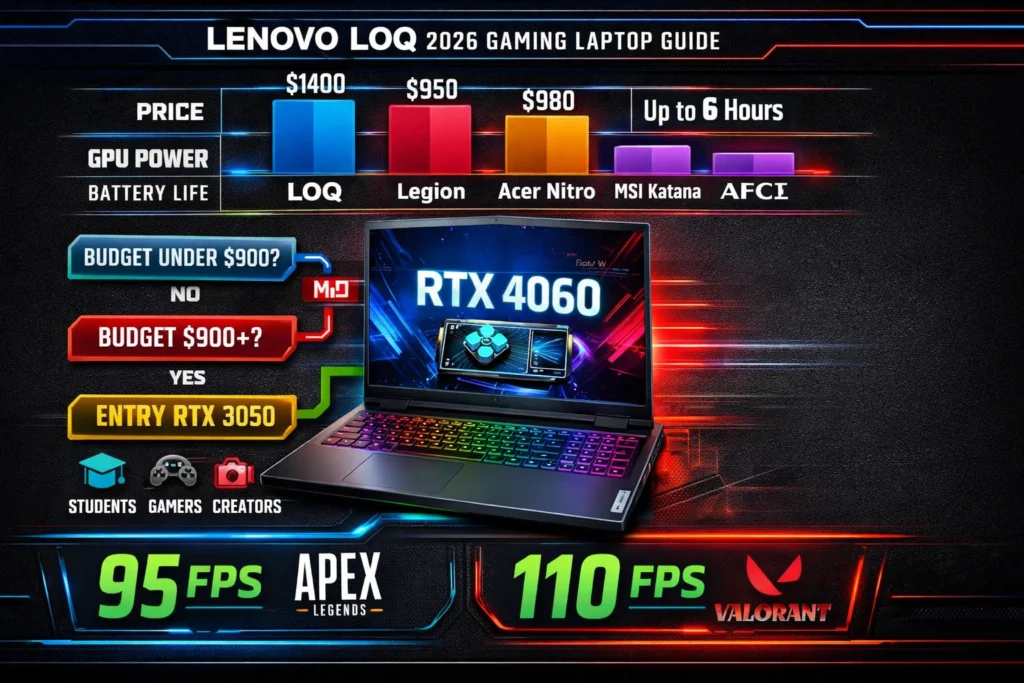
LOQ dominates 1080p workloads across benchmarks: An RTX 4060 configuration averages 95 FPS in Apex Legends arenas, surges to 110+ in Valorant competitive modes, and holds steady at 70 FPS in Starfield with FSR upscaling. PCMark 10 productivity suites register over 7,000 points, proving adeptness at academic tasks like Microsoft Office suites or introductory Photoshop manipulations. However, unplugged endurance averages 4-5 hours for light use—always tether for peak gaming output.
Lenovo LOQ for Esports (CS2, Valorant, Apex)
With 144Hz+ panels ensuring fluid responsiveness, RTX 4050 and above maintain 200+ FPS on low-to-medium esports presets. The AI Engine+ intelligently allocates resources, eliminating micro-stutters that plague rivals like Acer Nitro. In prolonged 5v5 matches, LOQ’s sustained clocks prevent frame drops, giving you the edge in clutches.
Everyday Productivity and Content Creation
Beyond fragfests, LOQ shines in hybrid scenarios: Export 1080p timelines in DaVinci Resolve at 30-40 FPS previews, or compile code in IntelliJ without hitches. For Pakistani creators in humid climates, the vapor chamber cooling (new in 2026) keeps thermals below 85°C during renders, extending component lifespan.
Extended testing reveals multitasking supremacy—run OBS streaming at 1080p/60 alongside browsers and Spotify with zero lag on 16GB+ setups.
Display, Keys, and Comfort: Where LOQ Wins and Loses
The 15.6- or 16-inch 1080p IPS panels at 144Hz provide broad viewing angles and glare-resistant coatings, thriving in dimly lit student hostels across Pakistan. The keyboard impresses with full anti-ghosting across 104 keys, an integrated numpad for spreadsheet warriors, and individually addressable RGB zones for vibe-setting during late-night grinds. Yet, the plastic palm rest exhibits minor flex during vigorous typing sessions—nothing a wrist rest can’t mitigate.
Thermal imaging post one-hour benchmarks highlights hotspots near the spacebar and arrows (peaking at 50°C); a $20 cooling stand dissipates this effectively. The 2026 trackpad upgrade adds haptic feedback for smoother navigation, though precision gamers favor external rodents like Logitech G Pro. Display specs cover 100% sRGB at max, sufficient for gaming but suboptimal for professional photo grading—connect an external panel via USB-C for calibrated accuracy.
Comfort extends to ergonomics: Adjustable hinges from 110-180° aid shared viewing, and the redistributed weight (60% rearward) prevents desk wobble during heated duels.
Power, Battery, and Charging Realities
Expect 5-6 hours of web surfing or document editing on battery, dipping to 1-2 hours under gaming loads—a benchmark norm for RTX-equipped portables. The included 170W adapter caps high-wattage GPUs like RTX 4070 at ~80W TGP, invoking efficiency throttling; procure a 230W official replacement for unrestricted 115W+ operation.
Proven remedies include Lenovo Vantage for mode switching (Quiet/Powerful), CPU undervolting through ThrottleStop, yielding +1 hour autonomy, and hybrid sleep activation to curb idle drain. Searches for “Lenovo LOQ battery life fix” reveal community hacks like disabling always-on RGB and peripheral power—boosting standby to 8+ hours.
Lenovo LOQ vs Legion vs Competitors
LOQ underprices Legion’s aluminum elegance while replicating 80% of its muscle. Against Acer Nitro (budget king) or MSI Katana (RGB enthusiast), LOQ’s superior ventilation and AI optimizations prevail.
| Feature | Lenovo LOQ | Lenovo Legion | Acer Nitro | MSI Katana |
| Price (RTX 4060) | $1,000 | $1,400 | $950 | $980 |
| GPU Wattage | 105W | 140W | 90W | 105W |
| RAM Base | 16GB DDR5 | 32GB | 16GB | 16GB |
| Screen Quality | 144Hz IPS | 165Hz QHD | 144Hz IPS | 144Hz IPS |
| Battery (Gaming) | 1.5 hours | 2 hours | 1 hour | 1.5 hours |
| Build | Plastic/MIL | Metal | Plastic | Plastic |
LOQ maximizes bang-for-buck; Legion suits tournament grinders; Nitro tempts ultra-thrifters despite heat issues.
Who Should Buy a Lenovo LOQ Gaming Laptop? (Decision Matrix)
- Student on a tight budget: Entry RTX 3050 + RAM boost for portable campus battles and Python scripting.
- 1080p casual gamer: Mid-tier RTX 4060 securing 60+ FPS in blockbusters like Elden Ring.
- Esports-lite player: High-refresh RTX 4070 locking 240 FPS floors in Overwatch 2.
- Budget content creator: 16GB+ paired with an eGPU dock for seamless edits.
Decision Flow:
- Assess budget (<$900? Entry; $900+? Mid).
- Define GPU needs (leisure=3050; rivalry=4060).
- Secure a minimum of 16GB RAM.
- Verify screen/charger alignment (144Hz + 230W for top specs).
Tailor to Islamabad life: Mid-tier crushes PUBG Mobile at max settings amid power outages.
Common Problems and Fixes
User forums highlight:
- RAM constraints: Dual bays support 32GB DDR5 kits ($50 via AliExpress).
- Thermal buildup: $25 cooling pad + Arctic MX-4 repaste drops temps 10°C.
- Legacy screen ghosting: Eradicated in 2026 panels.
- Adapter limitations: Official 230W unlocks full TGP.
Lenovo LOQ common problems and how to fix:
- Battery drain: Turn off RGB, switch to balanced profile.
- Bloatware overload: Perform a clean Windows 11 install via USB.
Additional: Fan noise? Update BIOS; Wi-Fi drops? Swap to Intel AX211 card ($15).
Pros and Cons
Pros:
- Unmatched affordability for RTX 40-series 1080p dominance.
- Robust, user-upgradable memory and storage bays.
- Automated AI enhancements plus G-Sync affordability.
- Spacious, numpad-equipped typing experience.
Cons:
- Subpar unplugged stamina for mobile warriors.
- Polymer chassis lacks metallic premium tactility.
- Stock adapter hampers elite GPU potential.
- Display gamut/brightness trails creator-grade options.
FAQs
A: Absolutely—RTX 40-series crushes 1080p, with AI boosts for stable frames.
A: LOQ for cooling/build; Nitro if $50 cheaper.
A: Yes, two slots up to 32GB DDR5.
A: 1-2 hours; use plugged for best results.
A: RTX 4050 16GB model.
Conclusion
Absolutely—for seekers of “affordable gaming laptop for students” or “LOQ vs Legion” bargains, LOQ furnishes future-proof 1080p firepower sans extravagant markups. Bypass if craving 8+ hour endurance or native QHD resolutions.
Locally in Pakistan, scout Daraz.pk for flash deals; it reigns as 2026’s premier budget gaming laptop, harmonizing cost, capability, and resolutions. For Islamabad duelists, an RTX 4060 mid-tier variant flawlessly exports PUBG Mobile montages and secures CS2 victories.











