Introduction
The popularity of Touchscreen HP Laptop devices has significantly increased in 2026 as users increasingly demand hybrid computing systems that function both as a traditional laptop and a tablet-like interface. This transformation in user behavior is driven by students, digital creators, professionals, and everyday users who prefer flexibility over rigid computing systems.
HP has positioned itself as a leading brand in this category, particularly through its well-known x360 convertible lineup, which dominates the mid-range and premium touchscreen laptop segment.
Explanation
This comprehensive guide will break down everything you need to know in simple yet detailed terms, including:
- Detailed HP touchscreen laptop series breakdown
- Real-world advantages and limitations
- Performance and battery consumption truth
- Comparison with non-touch laptops
- Ideal user profiles and unsuitable use cases
- Expert-level recommendations for 2026
By the end of this guide, you will have a crystal-clear understanding of whether investing in a Touchscreen HP Laptop is a smart decision for your specific needs.
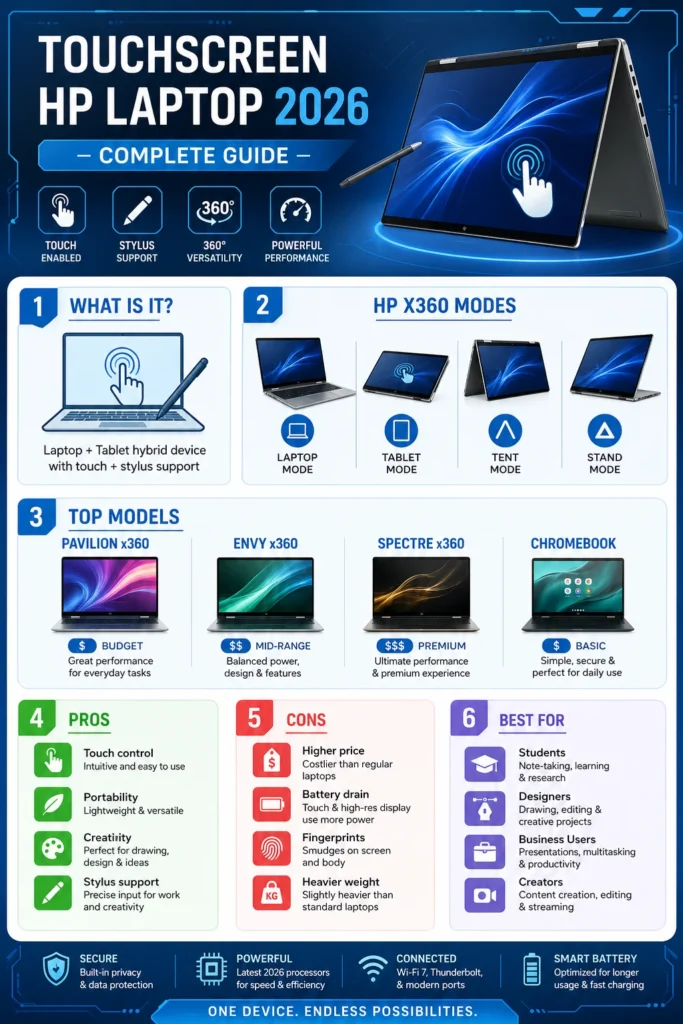
What is a Touchscreen HP Laptop? (Simplified Explanation)
A Touchscreen HP Laptop is a computing device that integrates a touch-sensitive display, allowing users to interact directly with on-screen elements using fingers or a digital stylus instead of relying exclusively on a keyboard and mouse.
This interaction model enables users to:
- Tap applications like a smartphone interface
- Scroll web pages naturally using finger gestures
- Zoom images using pinch gestures
- Write or draw using stylus input
Most modern HP touchscreen laptops also fall into the 2-in-1 convertible category, meaning they can transition between laptop and tablet modes.
Understanding HP x360 Technology
The term x360 refers to HP’s 360-degree hinge design mechanism, allowing the screen to rotate fully backward.
This engineering innovation enables four distinct usage modes:
- Laptop Mode → Ideal for typing, productivity, and office tasks
- Tablet Mode → Best for drawing, reading, and touch interaction
- Tent Mode → Perfect for media viewing and presentations
- Stand Mode → Useful for browsing and content consumption
This versatility is the core reason behind the popularity of HP touchscreen laptops.
Types of Touchscreen HP Laptops (2026 Model Breakdown)
HP categorizes its touchscreen laptops into multiple product families based on pricing, performance capabilities, and target audience.
HP Pavilion x360 – Affordable Entry-Level Choice
The HP Pavilion x360 represents the budget-friendly segment of touchscreen convertible laptops.
Key Features:
- Economical pricing structure
- 2-in-1 foldable design
- Full HD touch display
- Intel or AMD mid-tier processors
- Lightweight construction suitable for portability
Ideal For:
- University and school students
- Basic office workloads
- Online browsing and streaming
- Virtual classes and meetings
Limitations:
- Not designed for intensive workloads
- Average thermal management under pressure
- Basic material build compared to premium models
The HP Envy x360 sits in the mid-range segment and is widely considered the most balanced option.
Key Features:
- Premium aluminum chassis
- Strong multitasking capabilities
- High color accuracy display panels
- Stylus compatibility support
- Improved cooling efficiency
Ideal For:
- Freelancers
- Digital content creators
- Designers and students in creative fields
Key Strength:
It delivers an optimal balance between:
Performance + Affordability + Premium design
HP Spectre x360 – Premium Flagship Experience
The HP Spectre x360 is HP’s most advanced and luxurious convertible laptop series.
Key Features:
- Ultra-slim premium design
- OLED and 4K display options
- Latest Intel Core Ultra processors
- Highly responsive stylus precision
- Exceptional battery optimization systems
Ideal For:
- Business executives
- High-end creative professionals
- Premium users demanding top-tier quality
Limitation:
- Expensive compared to other HP models
Conclusion: Best overall Touchscreen HP Laptop in 2026
HP Chromebook Touchscreen – Cloud-Based Simplicity
HP also offers touchscreen Chromebooks powered by ChromeOS instead of Windows.
Key Features:
- Extremely fast boot-up speed
- Lightweight operating system
- Long-lasting battery efficiency
- Seamless Google ecosystem integration
Ideal For:
- Students
- Light users
- Cloud-based workflows
Limitation:
- Cannot run heavy professional applications (Adobe, AutoCAD, etc.)
Core Features of Touchscreen HP Laptops
Stylus Compatibility
Ideal for:
- Digital illustration
- Handwritten notes
- Graphic designing
Convertible Design
Switch seamlessly between laptop and tablet modes.
Windows 11 Optimization
Modern OS support enhances touch-based navigation.
High-End Display Technology
Includes:
- Full HD panels
- 2K resolution screens
- OLED display technology (premium segment)
Real Advantages of Touchscreen HP Laptops
Intuitive User Experience
Touch interaction feels more natural and responsive.
Enhanced Creativity
Perfect for:
- Designers
- Illustrators
- Students taking handwritten notes
Presentation Efficiency
Tent mode is highly effective in professional environments.
Multi-Functional Device Replacement
Replaces both tablet and laptop simultaneously.
Modern Hybrid Workflow Compatibility
Ideal for remote work and flexible environments.
Disadvantages (Important Hidden Factors)
Reduced Battery Efficiency
Touch functionality increases power consumption by 10–20%.
Higher Purchase Cost
Touchscreen models are more expensive than non-touch alternatives.
Screen Reflection Issues
Glossy panels may cause visibility problems under bright light.
Slightly Heavier Design
360-degree hinges increase overall device weight.
Fingerprint Accumulation
Touch screens require frequent cleaning.
Touchscreen HP Laptop vs Non-Touch HP Laptop
| Feature | Touchscreen Laptop | Non-Touch Laptop |
| Price | Higher | Lower |
| Battery Life | Slightly reduced | Better efficiency |
| Flexibility | 2-in-1 convertible | Fixed design |
| Weight | Heavier | Lighter |
| Productivity | Better for creatives | Better for typing-heavy work |
| Durability | Hinge wear risk | More stable |
Who Should Buy a Touchscreen HP Laptop?
- Students using handwritten digital notes
- Designers and digital artists
- Business professionals giving presentations
- Freelancers requiring flexibility
- Users wanting tablet + laptop hybrid functionality
Who Should Avoid It?
- Gamers needing raw GPU performance
- Budget-conscious users
- Users focused only on typing tasks
- People needing maximum battery endurance
Best Touchscreen HP Laptop Recommendations (2026)
| Category | Recommended Model |
| Budget | HP Pavilion x360 |
| Mid-Range | HP Envy x360 |
| Premium | HP Spectre x360 |
| Basic Use | HP Chromebook |
Performance Reality (Important Technical Truth)
A touchscreen does NOT improve system processing speed.
Performance depends on:
- CPU architecture
- RAM capacity
- SSD speed
- Thermal design efficiency
Touch functionality only enhances interaction, not computational power.
Battery Performance Explanation
Touchscreen devices consume more energy due to:
- Active touch sensor layers
- Higher display brightness requirements
- Continuous input detection systems
Result:
- Non-touch laptops last longer
- Touch laptops offer flexibility but slightly reduced runtime
Stylus & Creative Work Capabilities
Supported devices enable:
- Sketching and illustration
- Note-taking and annotation
- PDF editing
- Digital design workflows
The best performance is found in the HP Envy x360 and HP Spectre x360.
Common Buying Mistakes
- Buying due to touchscreen hype without need
- Ignoring battery trade-offs
- Selecting the wrong HP series for usage requirements
- Overpaying for unused premium features
Is a Touchscreen HP Laptop Worth It in 2026?
YES if:
- You need creativity tools
- You want hybrid laptop-tablet flexibility
- You use stylus input frequently
NO if:
- You prioritize performance per dollar
- You need maximum battery life
- You only perform typing or browsing tasks
FAQs
A: Yes, especially Pavilion x360 and Envy x360 models.
A: Yes, typically by around 10–20%.
A: Yes, it can be disabled via Windows Device Manager settings.
A: The HP Spectre x360 is the top premium choice.
A: Yes, but hinge durability depends on usage care.
Conclusion
The Touchscreen HP Laptop ecosystem in 2026 represents one of the most adaptable and versatile computing categories available today.
When chosen correctly, it delivers:
- Enhanced productivity
- Modern hybrid usability
- Improved creative workflows
When chosen incorrectly, it may result in unnecessary expense and underutilization of features.











